Website operations · September 3, 2026
Website Uptime Monitoring for Small Businesses: What to Check Beyond the Homepage
A green homepage monitor is reassuring. It is less reassuring when your checkout, enquiry form or stock update has quietly stopped working.
Imagine a customer can browse your store but cannot complete a purchase. Your homepage still loads, your monitoring dashboard stays green and the first warning arrives as a frustrated email. The monitor did its job. You simply asked it too narrow a question.
Useful monitoring starts with the work your website must perform. For a small business, the aim is to detect meaningful failures and get them to someone who can respond—not collect the largest possible number of green indicators.
The practical starting point
List your critical customer journeys, assign a suitable check to each, choose one person responsible for alerts and test the notification route. Begin with a few meaningful monitors. Add coverage when you can explain which failure a new check would catch.
1. Decide what “working” means
Write down the three actions that matter most. An online store might choose viewing a product, completing checkout and receiving fresh stock data. A service business might choose reading its services page, submitting an enquiry and receiving that enquiry in the correct inbox.
For each action, finish this sentence: “We would lose business if…” The answer tells you what to monitor and, just as importantly, what your chosen monitor cannot prove.
| Business concern | Useful check | Remaining blind spot |
|---|---|---|
| The public site is unavailable | HTTP(S) check on an important public URL | A successful response alone does not prove the page works for a customer. |
| The page returns an error message with a successful status | Check for expected or unexpected text | The text can be present while other features remain broken. |
| A scheduled update stops running | A heartbeat emitted after successful completion | A signal emitted at job start can hide a later failure. |
| Customers cannot finish a transaction | A controlled transaction test or a separate browser journey monitor | A basic uptime check does not exercise the full journey. |
UptimeRobot documents several check types, including HTTP, keyword and heartbeat monitoring. Its monitoring-type guide describes their different purposes. The table above is our coverage framework, not a claim that every listed test is included in every UptimeRobot plan.
2. Put the success signal in the right place
A useful hypothetical example is a nightly stock import. A signal saying “the script started” is weaker than one saying “the file was processed and the expected update completed.” Define success before connecting any alert.
Suppose the import should finish by 02:20. Your monitoring policy might allow a reasonable delay and flag a missed completion after that window. The exact allowance should reflect the real job, not a universal number copied from a guide.
UptimeRobot's heartbeat explanation describes a service that expects periodic requests to a unique URL and flags missing requests. That signal still depends on where you place it in your own workflow. Keep the heartbeat URL private and do not put it in public examples.
3. Design the alert before adding more monitors
An alert needs an owner, an action and a fallback. “Website down” sent to an unmonitored shared inbox is not a response process. Use descriptive names such as “Main store: public product page” so the recipient knows what failed.
Keep a short response note beside each important monitor: the affected service, where to check current incidents, who can fix it and who takes over if the first person is unavailable. For a solo business, that fallback may be the hosting provider's support route rather than a second employee.
Also avoid relying entirely on the same system you are monitoring. If website and email share an infrastructure failure, an email alert may be less useful. Evaluate an additional supported notification channel for incidents that matter.
Attach the response plan
Link the monitor's response note to a plan the owner can use under pressure. Our outage response guide supplies the first-30-minute plan, customer update templates and recovery checks.
4. Understand what the check interval buys
A shorter interval can reduce the time until a failure is observed, but it does not guarantee an equally fast notification or repair. Confirmation logic, network behavior and your own response time all affect the result.
For a simplified illustration, a failure that begins immediately after a scheduled five-minute check may wait almost five minutes for the next scheduled observation. A brief interruption entirely between observations could be missed. This is interval arithmetic, not an UptimeRobot performance benchmark.
At the time of checking, UptimeRobot's pricing page lists five-minute checks for Free and 60-second checks for Solo. Monitor allowances, integrations and advanced features vary by plan. Some public product pages describe older plan combinations, so verify the current selection and billing period before purchasing.
5. Run a safe notification drill
Do not break the live checkout to find out whether an alert works. Use an endpoint you own and can safely change, or a test notification function if your selected setup provides one. Keep the test separate from customer transactions.
- Trigger a controlled failure on the test target.
- Record when it began, when detection appeared and when the alert arrived.
- Check the message makes sense on the recipient's phone.
- Restore the target and verify how recovery is reported.
- Repeat the handoff exercise with the person or support route responsible for responding.
A notification test proves the notification route; it does not prove your checkout is covered. Keep those two questions separate when evaluating the trial.
Our controlled UptimeRobot keyword test
Tested September 3, 2026: we used an isolated page on our own GitHub Pages website to check whether UptimeRobot would notice missing content, record an incident and recognise recovery. The page stayed readable throughout. We did not interrupt the homepage, a checkout or customer transactions.
The setup we actually used
- Choose Keyword monitoring and enter the test page URL.
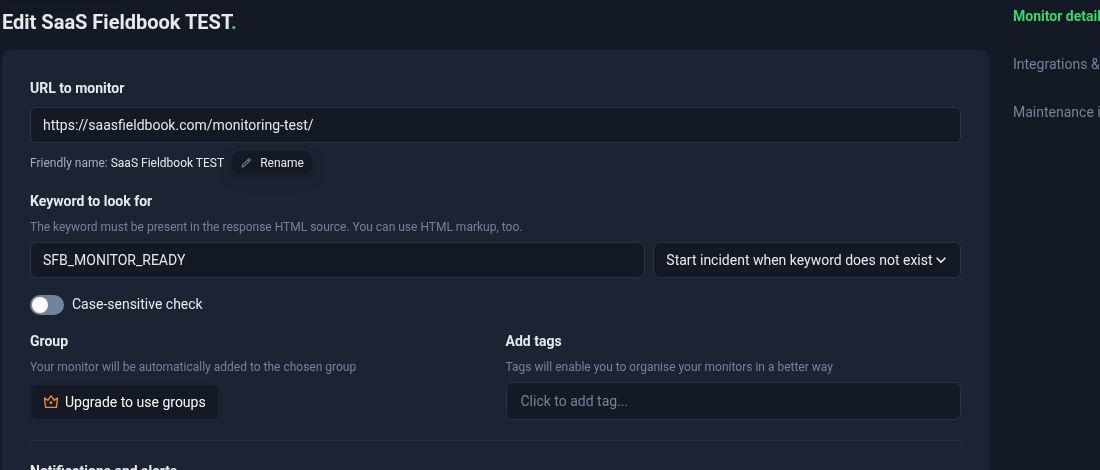
- Click Rename beneath the URL to set a recognisable name. Ours was SaaS Fieldbook TEST.
- Enter
SFB_MONITOR_READYin Keyword to look for and select Start incident when keyword does not exist. The Add tags field is for organisation; it does not define the content check. - Keep the Free account's five-minute interval and enable the existing email recipient. We left case sensitivity off and did not add paid channels.
What happened
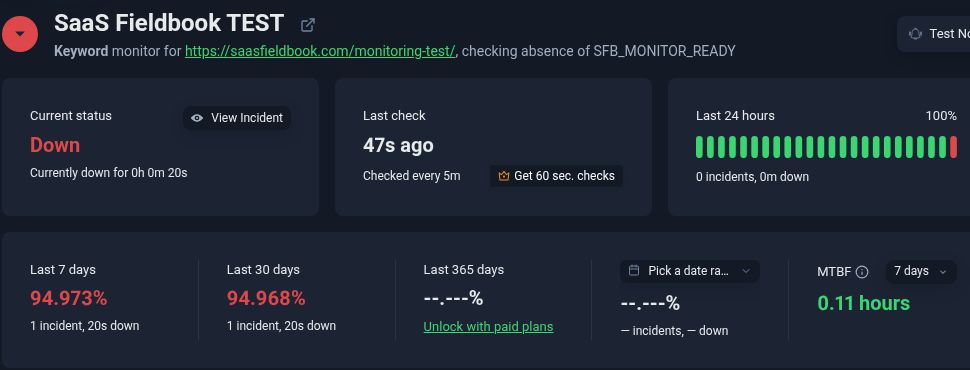
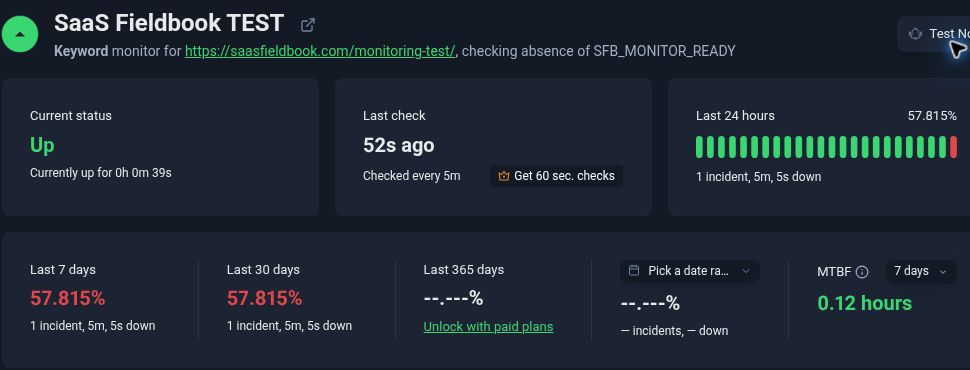
We first verified an Up state, then replaced the marker on the isolated page. UptimeRobot subsequently showed Down, with the recorded cause Keyword has not been found. Its incident log listed an initial detection followed by confirmations from three other locations.
| Observation | Time, September 3 (UTC+3) | Evidence |
|---|---|---|
| Missing marker observed on the exact monitored URL | 21:07:19 | Our browser observation after publishing and reloading the page |
| First keyword failure detected | 21:09:10 | UptimeRobot incident activity log |
| Incident confirmed and started | 21:09:54 | UptimeRobot incident activity log |
| Failure email logged as sent successfully | 21:09:55 | UptimeRobot sending log; receipt subsequently confirmed in the recipient’s Gmail screenshot |
| Healthy marker observed again | 21:11:35 | Our browser observation after restoring the original page |
| Incident resolved | 21:14:59 | UptimeRobot log; recorded incident duration: 5 minutes 5 seconds |
| Recovery email logged as sent successfully | 21:15:01 | UptimeRobot sending log; receipt subsequently confirmed in the recipient’s Gmail screenshot |
Inbox receipt confirmed: the recipient subsequently supplied a Gmail screenshot showing the actual incident email “Monitor is DOWN: SaaS Fieldbook TEST” at 21:09 and the recovery email “Monitor is UP: SaaS Fieldbook TEST” at 21:15. The separate messages prefixed “TEST:” at 21:03 were notification tests and are not evidence of the controlled incident. The screenshot establishes receipt of both real alerts, but its minute-level timestamps do not establish exact delivery latency. We have not published the private inbox image.
The log separates detection from confirmation: those steps were 44 seconds apart in this incident. It logged email sending one second after confirmation. Neither figure measures delivery to the recipient's inbox. The browser observations also do not establish the exact moment the changed content became available at every location; publication, caching and the polling schedule prevent treating this as a precise end-to-end speed benchmark.
What this test proves—and what it leaves open
This one drill demonstrates missing-keyword detection, receipt of failure and recovery emails, and recovery recognition for our static test page. It does not validate checkout, form delivery, JavaScript-rendered content, heartbeat monitoring, SMS or push alerts. For your own trial, use an endpoint you control, remove the marker completely from the response and keep a restoration copy ready. Verify the recipient actually receives and understands the alert before relying on that route.
Once an alert arrives, use the outage response and customer-update guide for the next steps. A keyword check answers a narrow question about page content; it cannot replace checking the affected customer journey.
Where UptimeRobot fits
UptimeRobot is worth evaluating when you need external checks and notifications without maintaining your own monitoring server. Start by matching its documented features to the coverage gaps above. A basic public-page check may be enough for a simple information site; a store dependent on payments and scheduled imports needs a more explicit coverage plan.
If your existing hosting or commerce platform already provides useful monitoring, compare what it actually checks, where alerts go and whether its checks are independent of the infrastructure being monitored. A second tool is justified by additional coverage, not by having another dashboard.
Evaluate it against your own response process
Pick a small set of meaningful checks and test an alert before deciding whether you need a paid plan.
Affiliate link. SaaS Fieldbook may earn a commission from a qualifying purchase at no extra cost to you.
Your first monitoring checklist
- Critical customer journeys are listed, not just URLs.
- Each monitor has a clear purpose and a documented blind spot.
- Scheduled-job signals represent successful completion.
- An alert owner and fallback route are named.
- A controlled notification drill has been completed.
- Plan limits and recurring costs match the required coverage.
- Recovery checks include the affected customer journey.
For an international store, availability also includes reaching the correct regional page. Our country selector and geo-redirect guide explains how to test that journey. For a broader buying process, use our SaaS evaluation framework.
A monitoring setup earns its place when it helps someone notice, understand and respond to a real problem. The most useful question after any drill is simple: would we have known what to do?
Sources and methodology
Official sources are linked beside the product and platform claims they support. Features and commercial terms may change. The controlled-test section uses our saved monitor settings, browser observations, the UptimeRobot incident log and a recipient-provided Gmail screenshot confirming alert receipt. Screenshots are cropped captures of that real test, with account details excluded. This is one trial of a static keyword check, not a product score, delivery guarantee or comparison benchmark. Other feature discussions remain based on the linked official sources.
By Evija Āboliņa · Published September 3, 2026. Our editorial approach.